Garmin Edge
How do you carry a power plan on your Garmin during a race?
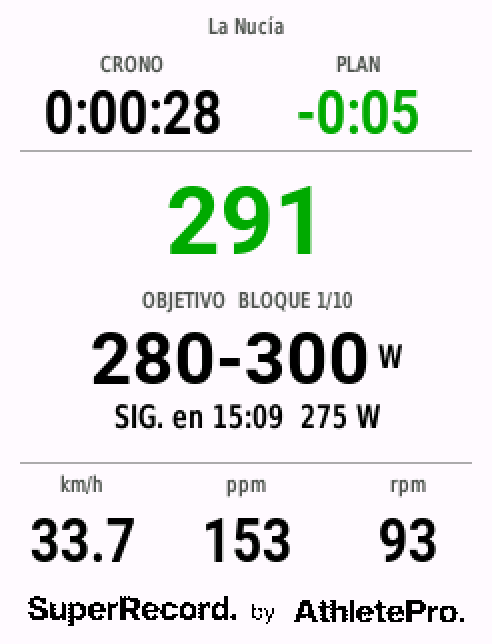
A segment-by-segment plan is useless if the rider has to remember a table mid-race. They need to see on the Edge how many watts are due now, how far to the next change and whether they are ahead of or behind the planned time.
The problem
- The plan stays in a PDF or a crib sheet taped to the stem that nobody reads at 50 km/h.
- Garmin structured workouts run on time, while in a race effort changes follow the course.
- The coach changes the plan the day before and does not know whether the rider got it.
- If the rider starts the timer on the ramp before the start, the whole plan drifts out of step.
Why it happens
In a time trial the target changes with the terrain: a rise, a corner, a windy stretch. The head unit has to know where the rider is on the course to show that segment’s target, not just how long they have been riding.
And the coach needs what they send to be exactly what the rider carries, with no manual steps in between.
How SuperRecord solves it
- 1
Install SuperRecord Pacer
A free data field from the Connect IQ store. It runs on the Edge 130 Plus, 530, 540, 550, 830, 840, 850, 1030, 1040, 1050, 1060 and Explore 2.
- 2
Pair the Edge once
The Edge shows a six-character code; the coach pastes it into the rider’s profile. It is done once per device.
- 3
Send the plan
With “Send to Garmin” from the plan. When the activity opens, the Edge downloads it through the phone and confirms which plan it has loaded.
- 4
Race
The field shows the current segment’s target, the rider’s power against it, the next change and the gap ahead or behind. The plan starts when the rider rides off, not when they press the timer.
- 5
Review afterwards
The target is written into the .FIT, so Plan vs Actual compares what was prescribed with what was ridden, segment by segment.
What you need
- A compatible Garmin Edge and the Connect IQ or Garmin Connect app on the phone.
- The phone nearby when opening the activity, to download the plan. It is not needed while racing.
Try it on a real time trial
The demo is a real time trial: change the power, the CdA or the wind and watch the time move. No sign-up.
Frequently asked questions
Which Garmin models are compatible?
Edge 130 Plus, 530, 540, 550, 830, 840, 850, 1030, 1030 Plus, 1040, 1050, 1060 and Explore 2. On the 130 Plus, plans can have up to 30 blocks.
Do I need my phone during the race?
No. The plan downloads when the activity opens with the phone nearby and stays stored on the Edge.
What if the rider uses a Wahoo?
The plan exports as a .FIT with a power target per segment. The live field with the gap to plan is Garmin only.
Can a rider have two coaches?
Yes. The same Edge can be paired with two coaches from different organisations, and the rider picks which plan to load from their “My plans” page.